I have created favicons for a number of friends and family. A favicon is an icon that you will see next to the address above and in the bookmarks folder. You will need to bookmark the page if you are using Internet Explorer. Then you have to close it and re-open the browser. But it shows up automatically if you are using Firefox.
Here are some of the icons I have created that are currently in use:


Here are a few more icons that are not yet in use:
 Eduneering
 Advanced
Business
Designs
Advanced
Business
Designs The Harriet Solit website
 The Foundation for
New Directions
The Foundation for
New Directions Gastropoda
 S A C H A
photography
S A C H A
photography
 dublab
 AxiomX Multimedia
 a smiley face
 a dead tree
 a live tree
 a binary tree
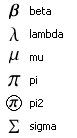 Here are some math related icons.
I might be willing to create an icon for you if you ask nicely.
For those of you who want to create your own icon, it is really easy. I use the Pixel Toolbox from AxiomX. It is free and very powerful. Just create a 16 x 16 icon and name it favicon.ico. Then all you have to do is put it in the root directory where you put your html files. Then put this line in the header of your pages:
<LINK REL="SHORTCUT ICON" HREF="favicon.ico">
I think that line might not be needed actually. But you will need it if you want to name your icon something other than favicon.ico. It wall also allow you to have multiple icons (1 per page) in your website.
- For more info on favicons, see: www.favicon.com
- And to try your hand at creating an icon right now, without having to install anything, try this online icon maker.